Google日本語入力 開発版がアップデート 1.5.1090.101

Google の日本語入力システム Google 日本語入力 開発版 がアップデートしてました。Mac OS X 版のバージョンは GoogleJapaneseInput-1.5.1090.101 となりました。辞書を更新した他、一般的によく知られている誤読をもしかしてのカタチで提示する機能がついたそうです。

Google 日本語入力の開発版をアップデートしました。(1.5.1090.10x)

さて、Google 日本語入力開発版 (Win, Mac) をアップデートしたことをお知らせします。既に Google 日本語入力開発版をお使いの場合は自動的に更新されますので、そのままお待ちください。

主な変更点は以下のようになります。

共通の変更点
・Web から構築した辞書を更新しました。
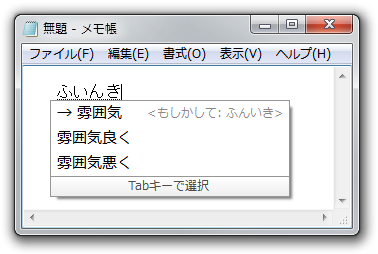
・「ふいんき→雰囲気」のような、一般に幅広く知られている誤読を「もしかして」の形で提示する機能を追加しました。

・漢数字変換の大字変換を変更し、「壱」を省略しないようにしました。例えば 1111 を変換すると「阡百拾壱」ではなく「壱阡壱百壱拾壱」になります。
・全角カタカナモードや半角英数モードで、「スペースの入力」設定が反映されないことがある問題を修正しました。
・キー設定やローマ字テーブルを編集するときに、候補の並べ替えを行ってから「新しいエントリー」を選択すると、設定ツールがクラッシュすることがある問題を修正しました。
・文字を一文字だけで再変換すると、Unicode 表記に変換できるようになりました。 (例: 『♪』を再変換 → 『U+266A』)
・デフォルトキーマップを変更し、Chrome OS 用に追加されていた、Ctrl+1、Ctrl+2 などの特殊なショートカットを各キーマップから削除しました。

Windows 版の変更点
・辞書ツールを起動している状態で再度辞書ツールを起動したときに、既に起動しているウィンドウが前面に出てこないことがある問題を修正しました。

Pixelmator 2.0.4 アップデート

Pixelmator Team の Mac OS X 専用画像処理ソフトの Pixelmator がアップデートしていました。Pixelmator 2.0.4 となります。このアップデートではローカリゼーションの改善や、多くのマイナーな改良を行なっているとのことです。

Pixelmator 2.0.4 (Released on May 17, 2012)

Improvements

• OS X Lion App Sandbox support adds a line of defense for user data
• Improved workflow for opening documents (click here to view a short video)
• Minor user interface improvements
• Info Bar now shows size of the selected layer
• Localization improvements

Other issues

• Fixes an issue that caused a blank document when quitting Pixelmator after importing a PDF file
• Fixes a problem that caused the user’s choice of Grid visibility options to be unsaved
• Fixes an issue that caused incorrect document positioning when the application left Full Screen
• Fixes a situation that caused an inability to tun off the Constrain Proportion option in the Transform feature
• Fixes a situation where the Smudge Tool painted corrupt image output
• Fixes an issue that disabled the arrange commands in the Slice Tool action pop-up menu
• Fixes an issue that caused an inability to enter some numbers in the Export for Web Colors field
• Fixes a situation where Shape layers were damaged after applying the Convert into Pixels command
• Fixes an issue that caused an ability to import unsupported files into the program
• Fixes a situation where an incorrect color was shown in the Gradient Tool toolbar thumbnail
• Fixes a problem that caused selection content to disappear when documents were closed
• Fixes a problem that caused layers to disappear after applying the Transform feature
• Fixes an issue that caused the Welcome Screen to be shown with other palettes
• Fixes a situation where brushes would become damaged
• Fixes an issue that caused an inability to create presets with the same name
• Fixes a problem that caused the angle stepper to function incorrectly when using Transform
• Fixes a problem that caused an incorrect document size after leaving Full Screen
• Fixes a problem that caused an incorrect document size when using the Duplicate command
• Fixes a problem that caused an incorrect document size when Restore was clicked while using Browse All Versions
• Fixes a problem that caused an inability to ungroup more than one group of layers at a time
• Fixes a problem that caused two documents to appear on quitting the application while using Browse All Versions
• Fixes a situation that sometimes caused an inability to use mouse scrolling in a document
• Fixes a situation where the Gradients palette became unusable
• Fixes a problem that would cause a document to become inactive
• Fixes a problem that sometimes caused an inability to change the selected tool in the Tools palette
• Fixes a problem that caused the program to stop responding when the Duplicate command was chosen during Export
• Fixes a problem that caused the program to quit unexpectedly when certain PSD files were imported
• Fixes a problem that caused the program to quit unexpectedly when Export for Web was chosen
• Fixes a problem that caused the program to quit unexpectedly when certain PXM files were opened
• Fixes a problem that caused the program to quit unexpectedly when certain Photoshop brushes were imported

Mac OS X Lion 10.7.4 アップデート

Apple が Mac OS X 10.7 Lion をアップデートし、Mac OS X 10.7.4 としました。ソフトウェアアップデートでアップデートできます。このアップデートで、安定性、互換性、セキュリティの向上がなされています。

アップデートは、すべての Lion ユーザに推奨とのことです。

10.7.4 アップデートはすべての OS X Lion ユーザに推奨され、お使いの Mac の安定性、互換性、セキュリティを改善する、以下のような一般的なオペレーティングシステムの修正を含んでいます:

・“再ログイン時にウインドウを再度開く”設定が常に有効になっている問題を解決します
・特定の他社製 USB キーボード(英国)との互換性を改善します
・ファイルがサーバに保存されないことがある問題を解決します
・ファイルを SMB サーバにコピーするときの信頼性を改善します

このアップデートについて詳しくは、この Web サイトを参照してください:http://support.apple.com/kb/HT5167?viewlocale=ja_JP
このアップデートのセキュリティ内容については、ここを参照してください:http://support.apple.com/kb/HT1222?viewlocale=ja_JP

iOS 5.1.1 アップデート

Apple は iOS をアップデート、iOS 5.1.1 の配信を開始しました。iTunes 経由、もしくは iOS5 搭載の iPhone / iPad / iPod touch はソフトウェアアップデート経由でもアップデートできます。

iOS 5.1.1 は Safari のブックマークの同期の信頼性向上や iMessage を利用する際に絵文字が正しく表示されない問題を修正したなどいくつかの問題点を修正しています。

このアップデートには、次のような機能向上とバグ修正が含まれています:

・“画面をロック”ショートカットを使用して撮影される写真にHDRオプションを使用するときの信頼性が向上
・新しいiPadで2Gと3Gネットワークの切り替えができない問題を修正
・一定の状況下で、ビデオのAirPlay再生に影響を及ぼす問題を修正
・Safariブックマークとリーディングリストの同期の信頼性が向上
・購入手続の完了後に“購入できません”通知が表示される問題を修正
・iMessageで絵文字が正しく表示されない問題を修正

ATOK for Android 1.2.2 アップデート

ジャストシステムは Android 端末向け ATOK をアップデートし、ATOK for Android 1.2.2 としました。このアップデートでは辞書が最新版となり、画面に表示する文字サイズなどがさらに大きくなる設定が追加されました。

このバージョンの新機能:

1. [2012/04/27 バージョン 1.2.2]
2. 以下の現象を回避・改善します。
3. ・パスワードロック画面で、ロックが外せなくなる場合がある
4. [2012/04/24 バージョン 1.2.1]
5. ・QWERTYキーボード(横画面)をさらに大きくできるようにしました。
6. ・候補一覧の文字サイズをさらに大きくできるようにしました。
7. ・カナ英数変換機能を強化しました。
8. ・辞書を最新版に更新しました。
9.・ATOK拡張辞書を追加、更新しました。
10.※ダウンロードはこちら https://market.android.com/search?q=com.justsystems.atokmobile.dldic
11.・[ATOKの設定]に以下の項目を追加しました。
12.-[画面・表示][キーサイズ]「QWERTYキーボード(横画面)ではさらに大きくする」
13.-[画面・表示][文字サイズ]「特大」

Pixelmator 2.0.3 アップデート

Pixelmator Team の Mac OS X 専用画像処理ソフトの Pixelmator がアップデートしていました。Pixelmator 2.0.3 となります。このアップデートでは、全体的なパフォーマンスの向上、多くのマイナーな改良を行なっているとのことです。

Pixelmator 2.0.3 (Released on April 24, 2012)

Improvements

• Improves the performance of the Move Tool
• Adds the ability to turn off Autosave in OS X Lion by typing the following command in the Terminal:
defaults -currentHost write com.pixelmatorteam.pixelmator “disableAutosave” -bool YES

• Edit > Deselect now uses the Command + D shortcut
• Edit > Duplicate now uses the Command + Shift + D shortcut
• The Tools palette is now inactive in Export for Web
• Adds the ability to overwrite slices in Export for Web
• Adds a new Hand Tool cursor
• Localization improvements

Memory leak fixes

• Fixes a memory leak that occurred when copying a selection or using Duplicate
• Fixes a memory leak that occurred when drawing shapes
• Fixes a number of other small memory leaks that occurred when using shapes
• Fixes a memory leak that occurred when saving PXM files
• Fixes memory leaks in the Layers thumbnails
• Fixes memory leaks in the Gradient Tool
• Fixes memory leaks in Export for Web and the Slice Tool
• Fixes a memory leak that occurred during Brush Tool cursor generation
• Addresses a document window memory leak

Other issues

• Fixes a situation where performance would degrade over time
• Fixes a problem that caused corrupt PXM files
• Fixes a problem that caused an inability to use the Load Selection feature with text layers
• Fixes an issue that caused different layer positions in the Layers thumbnails
• Fixes a problem that caused an inability to change TIFF file compression in the Save dialog
• Fixes a problem that caused an inability to change JPEG quality in the Save dialog
• Fixes an issue that caused the Welcome Screen to be shown with other floating palettes after Restore / Don’t Restore
• Fixes a problem that caused an inability to export all slices
• Fixes a problem that caused an inability to represent PNG Indexed and GIF images automatically in the Export for Web feature
• Fixes an issue that caused object handles to show when Export for Web was active
• Fixes an issue that caused colors to revert when a file was exported as WebP
• Fixes a problem that caused the ability to change shape fill colors in Export for Web
• Fixes an issue that caused gray edit lines in the Layers palette
• Fixes an issue that caused missing slices after Quit
• Fixes an issue that caused incorrect layer positioning in the Layers palette
• Fixes an issue that caused different PXM file previews to appear when the Export sheet was opened
• Fixes an issue that caused a white canvas after Export for Web
• Fixes a problem that caused the ability to enter Export for Web while showing an empty layer title
• Fixes a situation that caused incorrect titles to be entered in the Slice Tool
• Fixes a problem that caused an inability to create slices with the same title
• Fixes a problem that caused an inability to resize text layers
• Fixes an issue that caused the bounding box to disappear when a text layer was rotated using the Type Tool
• Fixes a problem that caused an inability to localize presets when the localization was changed
• Fixes a problem that caused the inability to represent the Export for Web toolbar thumbnail properly
• Fixes a problem that caused an inability to save PNG Indexed and GIF images when using Export for Web
• Fixes an issue that caused incorrect file naming when a slice was exported
• Fixes a situation that caused missing slice names when Pixelmator was inactive
• Fixes a problem that made it possible to enter text when Export for Web was active
• Fixes an issue that caused editable control points to appear on a Shape layer when Export for Web was active
• Fixes a problem that caused changing of a text layer’s color when Export for Web was active
• Fixes a problem that caused the inability to export slices containing only a few pixels
• Fixes an issue that caused the label ‘Quality’ to be dimmed in Export for Web
• Fixes an issue that caused document window flickering when Export for Web was active
• Fixes a problem that caused the inability to save Export for Web toolbar options after the thumbnail was dragged to the Finder
• Fixes a problem that resulted in different behaviors from using the Command + Shift + E shortcut and from clicking Share > Export for Web when a slice was created
• Fixes an issue that caused a black canvas when the Slice Tool was selected
• Fixes a problem that caused the ability to open an incorrect contextual menu when Export for Web was active
• Fixes a problem that caused an inability to enter Transform from the Type Tool’s contextual menu
• Fixes a situation that caused incorrect tool icon positions in the Tools palette
• Fixes an issue that caused the Welcome Screen to appear on the Desktop when a document was created in Full Screen
• Fixes an issue that caused the Welcome Screen to appear when a PXM file was opened
• Fixes a problem that caused LaunchBar to quit unexpectedly
• Fixes a problem that caused an inability to open PSD files that contained more than 185 layers
• Fixes a situation that sometimes caused the program to quit unexpectedly when Canvas Size was changed
• Fixes a situation that sometimes caused the program to quit unexpectedly when opening Pixelmator
• Fixes an issue that caused the program to quit unexpectedly when a text layer was converted into pixels and Edit > Undo was chosen
• Fixes an issue that sometimes caused the program to quit unexpectedly when the Photo Browser was open
• Fixes a situation that caused the program to quit unexpectedly when slice colors were changed
• Fixes an issue that sometimes caused the program to quit unexpectedly when PXM files were opened
• Fixes a situation that caused the program to quit unexpectedly when the canvas was zoomed in or out
• Fixes a situation that caused the program to quit unexpectedly when a large number of layers were created
• Fixes a problem that caused the program to quit unexpectedly when layers were merged

Google日本語入力 開発版がアップデート 1.5.1053.101

Google の日本語入力システム Google 日本語入力 開発版 がアップデートしてました。Mac OS X 版のバージョンは GoogleJapaneseInput-1.5.1053.101 となりました。辞書を更新した他、漢数字の変換方法を変更したとのことです。

Google 日本語入力の開発版をアップデートしました。(1.5.1053.10x)

さて、Google 日本語入力開発版 (Win, Mac) をアップデートしたことをお知らせします。既に Google 日本語入力開発版をお使いの場合は自動的に更新されますので、そのままお待ちください。

主な変更点は以下のようになります。

共通の変更点

・Web から構築した辞書を更新しました。
・文字パレットの Unicode 領域で、各ブロック最後の文字が表示されない問題を修正しました。
・漢数字変換の方法を変更しました。この変更により例えば 123456 から 12 万 3456 が変換できるようになったり、12 の変換候補から壱拾弐が消えたりしています。

ATOK Pad for iOS 4.3.0 アップデート

ジャストシステムは iPhone / iPad 用の日本語入力メモアプリ ATOK Pad for iOS をアップデートし、ATOK Pad for iOS バージョン 4.3.0 としました。文字入力の反応速度を改善するなどしているそうです。

【バージョン 4.3.0】2012年4月18日

○iPhone 版のユーザーインターフェースを改善しました。
○文字入力の反応速度を改善しました。
○以下の不具合を修正しました
 ・ユーザー登録ができない。
 ・タブ文字の幅がおかしくなることがある。
 ・iPad でキーボードを切り替えると日本語モードになる。
 ・iPad で「ー」が入力できなくなることがある。